
Three Consoles. One Library. Zero Setup.
Switch between PSX, PSP & PS2 from one console-grouped library. Tap a game, it downloads, it plays — the emulator is already inside the app. No RetroArch, no BIOS hunting, no separate installs.
Every Feature, Already Shipped. Nothing Hypothetical.
This is a straight list of what's in the current build — no roadmap items, no "coming soon." If it's on this page, you can tap it today.
Built-In Emulator — No External Hand-off
Unlike catalog apps that dump a file and leave you to configure DuckStation or PPSSPP yourself, Neo Games PS embeds the emulator directly. PSX & PSP run on LibretroDroid; PS2 runs on its own dedicated native engine.
- Dedicated :game process keeps the UI responsive
- Tap a finished download and it plays — no BIOS hunting
- Auto frameskip option for lower-end phones
- Falls back cleanly if a device truly can't run the PS2 engine
A Download Manager That Actually Works
A dedicated Download tab tracks every transfer by status — queued, downloading, done — so nothing is a mystery.
- Pause, resume, and retry per game
- Wi-Fi-only mode to avoid burning mobile data
- Optional notifications showing live progress
- Clear image cache or delete all downloads from Settings
Save States & Auto-Save
Save and load state from the pause menu, plus automatic saving on exit so a dropped session never costs you progress.
- Manual save slots from the in-game pause menu
- Auto-save on exit (toggle in Settings)
- Per-game save history tracked in the app
- Works the same across PSX, PSP and PS2
Shader & Filtering Options
Pick how classics look on a modern screen — from a clean raster to a CRT-era phosphor glow.
- CRT scanline, LCD grid, and smooth upscale shader presets
- Bilinear filtering toggle for jagged 3D polygons
- Per-console default shader (CRT for PSX, LCD for PSP)
- Live FPS badge during gameplay
Touch Controls With Haptics
A responsive on-screen controller for every console, with the option to switch to haptic feedback for every press.
- Full D-pad, face buttons, and shoulder buttons on screen
- Haptic feedback toggle in Settings
- Layout adapts to the console being played
- Pause menu reachable without leaving the controller
Browse PSX, PSP & PS2 by Console
Home groups fresh titles per console; Library lets you filter by console and sort by Most Played, Most Downloaded, or genre.
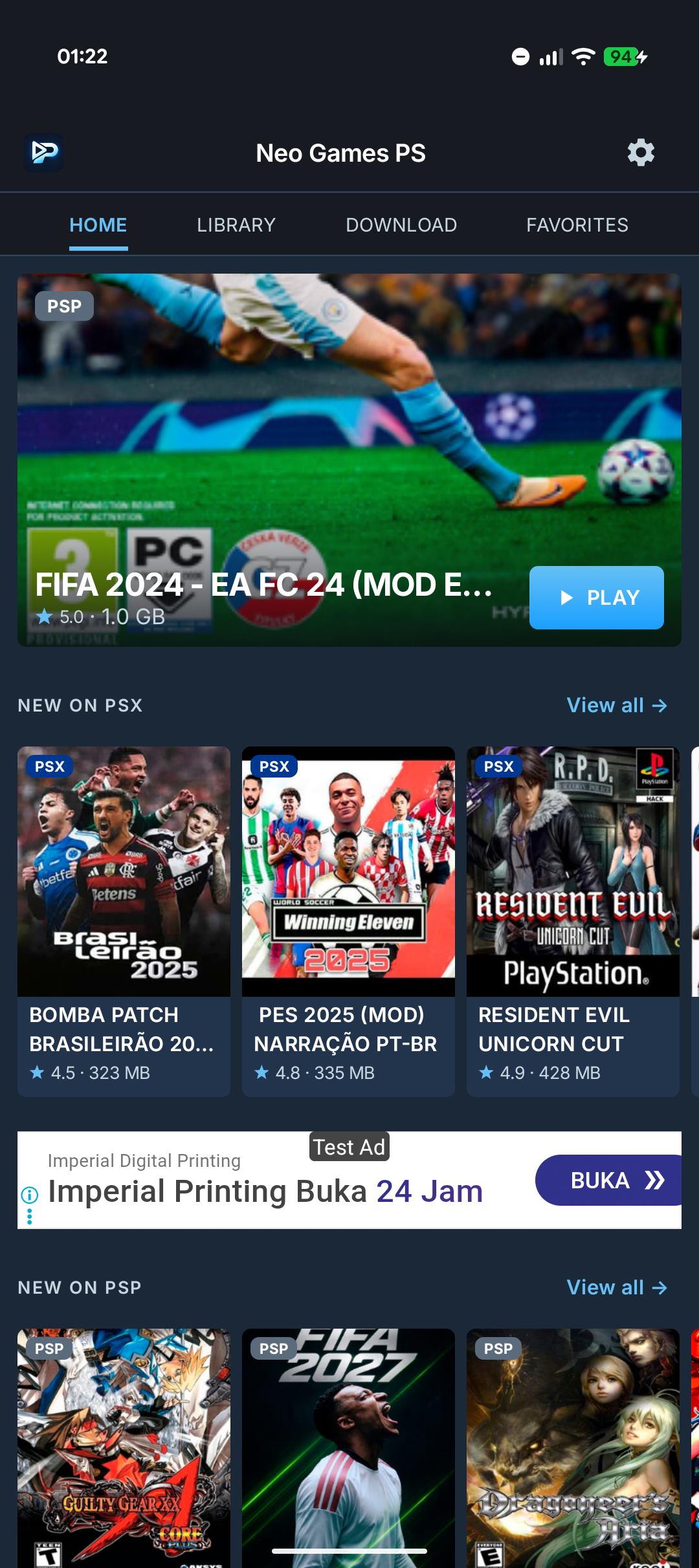
- Home: hero pick plus "New on PSX / PSP / PS2" rows
- Library: console filter chips + sort/genre chips
- Full game detail page with screenshots and description
- Related-games row on every detail page
Play Offline, Manage Storage
Once a game is downloaded, it plays with no connection needed — and Settings shows exactly what's using space.
- Storage usage bar with free space remaining
- Clear image cache in one tap
- Delete all downloads when you need the space back
- Download tab doubles as your offline-ready shelf
Favorites, Built In
Bookmark any game from its detail page and find it again instantly from the Favorites tab — no account required.
- One tap to favorite from any game detail screen
- Dedicated Favorites tab, separate from Downloads
- No sign-in needed to use it
- Works the same across all three consoles
See Neo Games PS In Action
Real device captures from the actual app — no mockups, no staged UI.
PSX, PSP & PS2 — Grouped, Not Mixed
A hero pick up top, then a row per console underneath
Home leads with a rotating hero capsule, then "New on PSX", "New on PSP", and "New on PS2" rows — each console gets its own lane instead of one blurred-together list.
Screen Highlights
Two Real Engines. Not A Bare Link Scraper.
Most competing apps are just file hosts that hand you a ROM and leave you to find, install, and configure a separate emulator yourself.
Neo Games PS bundles two real engines inside the APK: a LibretroDroid core for PSX and PSP, and a dedicated native PS2 engine — a separate integration, not the same Libretro stack. Both run isolated in a dedicated :game Android process, kept apart from the main UI.
Emulation runs isolated so a heavy workload never degrades the main UI.
CRT scanlines, an LCD grid look, and smooth upscaling — pick per session.
On-screen D-pad and face buttons with a haptic feedback toggle.
Manual save/load from the pause menu, plus auto-save on exit.
The Traditional Hassle vs. Neo Games PS
- ✕Forced to download and configure a separate emulator app
- ✕Downloads freeze partway with no resume functionality
- ✕Full-screen ads before you can even look at a game
- ✕Manual file management to find unzipped ROM files
- Built-in engines: tap GET, then tap PLAY immediately
- Resumable download manager with pause and retry
- No gameplay-interrupting ads
- Save states, shader presets, and haptic touch controls built in
Install, Pick a Game, Play
No command lines, no plugin hunting, no separate emulator to configure. Three taps and you're in a game.
Install the APK
Download the direct APK to your Android phone or tablet. The emulator for all three consoles is already bundled inside — nothing else to install.
Pick a Console, Pick a Game
Browse Home's console-grouped rows or switch the Library's console filter to PSX, PSP, or PS2. Tap GET and the download manager takes it from there.
Tap PLAY
No emulator hand-off, no BIOS hunting. The built-in engine for that console launches straight into the game, with touch controls, save states, and shader options ready.
Same Classics. Fewer Hoops to Jump Through.
The retro-gaming category is full of apps that hand you a ROM and leave you to figure out the rest, or bury you in ads before you can even look at a game. Here's what that comparison actually looks like.
"Typical app" reflects patterns seen repeatedly across competing PSX/PSP/PS2 apps during our own category research — not any single named competitor.
Frequently Asked Questions
Everything about emulation, downloads, controllers, and how the app works.
Your PSX, PSP & PS2 Library Starts Here
Browse, download, and play — no separate emulator, no BIOS hunting, no interruption ads mid-game.